When your iPhone 18 goes to voicemail without ringing, the cause may be a setting that silences certain calls—or a cellular or carrier issue that stops calls from reaching your phone. Work through the checks below in order, and test with an incoming call after each change.
The good news: in almost every case, this is a settings issue, not a hardware failure. Apple itself confirms that Focus modes, Screen Unknown Callers, and blocked contacts account for most cases of calls going straight to voicemail.
Why Does My iPhone 18 Go Straight to Voicemail?
Before jumping into fixes, it helps to understand the cause. Calls bypass your iPhone 18 and land in voicemail for one of these reasons:
- A Focus mode or Do Not Disturb is silencing incoming calls.
- Silence Unknown Callers is enabled and the caller isn’t in your Contacts.
- Airplane Mode, poor signal, or a network outage prevents the call from reaching your phone.
- Call forwarding is redirecting calls elsewhere.
- The caller is blocked (sometimes accidentally).
- A software bug — especially after an iOS 26 update.
How to Fix iPhone 18 goes to voicemail without ringing
Below are 11 methods to fix iPhone 18 goes to voicemail without ringing, ordered from fastest to most involved. Work through them in order — most people solve the problem within the first five steps.
Fix 1: Turn Off Focus Mode and Do Not Disturb
Focus modes (Do Not Disturb, Sleep, Work, Driving) silence calls and send them straight to voicemail.
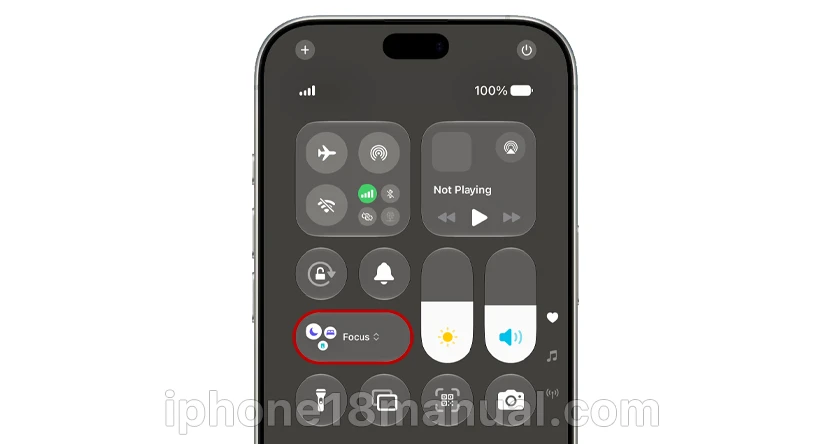
- Swipe down from the top-right corner to open Control Center.
- Look for a highlighted Focus icon (a moon or Focus label).
- Tap it, then tap it again to turn it off.
Tip: If you rely on Focus for work, you don’t have to disable it entirely. Go to Settings → Focus → [Your Focus] → People and set “Allow Calls From” to Everyone or Favorites.
Fix 2: Check the Ring/Silent Switch
On the left edge of your iPhone 18, above the volume buttons, is the Action Button or Ring/Silent switch. If your phone is silenced, you may think calls are going to voicemail when they’re actually ringing quietly.
Flip the switch so orange is not showing, then go to Settings → Sounds & Haptics and confirm your ringtone volume is up and a ringtone is assigned.
Fix 3: Disable Silence Unknown Callers
Introduced in iOS 13, this feature sends any call from a number not in your Contacts directly to voicemail — no ring, no warning. It’s the #1 cause of “my iPhone 18 goes straight to voicemail” complaints about calls from doctors, contractors, or delivery drivers.
- Open Settings → Apps → Phone.
- Scroll to Screen Unknown Callers (or “Silence Unknown Callers” on older iOS versions).
- Set it to Never.
Note that banks and offices often call from a different number than the one you have saved, which is why saved contacts can still get silenced.
Fix 4: Turn Off Airplane Mode (and Toggle It)
Airplane Mode suspends all cellular signals — calls go straight to voicemail until it’s off. Swipe into Control Center and make sure the airplane icon isn’t orange.
If Airplane Mode is already off, toggle it on for 10 seconds, then off. This forces your iPhone 18 to re-register with your carrier’s network and fixes many “phone unreachable” issues.
Fix 5: Review Blocked Contacts
It’s surprisingly easy to block a number by accident.
- Go to Settings → Apps → Phone → Blocked Contacts.
- Swipe left on any number that shouldn’t be there and tap Unblock.
Fix 6: Toggle Off Live Voicemail (The iOS 18.1+ Bug Fix)
This is the fix Apple Support won’t tell you about — but real users swear by it. After certain iOS updates (first reported with iOS 18.1 and recurring in some iOS 27 builds), a bug causes all incoming calls to go straight to voicemail even when every setting looks correct.
The workaround that worked for dozens of users:
- Go to Settings → Apps → Phone → Live Voicemail.
- Toggle Live Voicemail OFF.
- Power off your iPhone completely, then power it back on.
- Test with an incoming call.
- If calls now ring, you can toggle Live Voicemail back ON.
One MacRumors user confirmed: after this exact sequence, “calls incoming properly” — on a phone where Verizon support couldn’t help.
Fix 7: Turn Off Call Forwarding
Call forwarding redirects your calls before your phone ever rings.
- Open Settings → Apps → Phone → Call Forwarding.
- Make sure it’s off.
Fix 8: Check Your Signal, SIM, and eSIM
Weak coverage is a common culprit — especially if callers report your phone “rang once then went to voicemail,” which means the network found you briefly and gave up.
- Check signal bars: Move near a window or outdoors. If you’re in a dead zone, enable Wi-Fi Calling under Settings → Apps → Phone so calls route over Wi-Fi when cellular is weak.
- Reseat your SIM: Power off, remove the SIM (or eSIM tray), inspect for damage, reinsert, and restart.
- eSIM trouble? If you recently added a second eSIM, users report that deleting it and rebooting restored incoming calls on the primary line.
Fix 9: Check for Carrier Issues and Number Porting
If you recently switched carriers while keeping your number, an in-progress port can send calls to voicemail for up to 72 hours.
Also check for a local outage (Downdetector is handy) or carrier-side spam filtering — some carrier call-filter apps continue filtering even after you delete the app unless you follow their uninstall steps.
Fix 10: Update to the Latest iOS 27
Apple’s official guidance starts here for a reason: sometimes the bug is the update, and the fix is the next update. Go to Settings → General → Software Update. Several voicemail-routing bugs in past iOS releases were patched within weeks.
Fix 11: Reset Network Settings (Last Resort)
This wipes saved Wi-Fi passwords and cellular settings but resolves deep configuration issues.

- Go to Settings → General → Transfer or Reset iPhone → Reset → Reset Network Settings.
- Enter your passcode and confirm.
If calls still go straight to voicemail, contact your carrier — the issue is likely on their end, and they may need to replace your SIM or reset voicemail provisioning.
What If My Call Rings Once, Then Goes to Voicemail?
That specific pattern usually means one of three things:
- You’re blocked — but only one of several possibilities, not proof.
- Their phone is off or out of coverage and voicemail picked up quickly.
- Their ring-before-voicemail timer is short — some carriers let you extend this. On Vodafone, for example, dial **61*121*11*25# to set a 25-second ring time.
Frequently Asked Questions
Why does my iPhone 18 go straight to voicemail without ringing after an update?
Software bugs occasionally break call routing after major iOS releases. Update to the latest iOS version, toggle Live Voicemail off and on (Fix #6), and restart — this combination resolves most post-update cases.
Will I see missed calls if my phone sends them straight to voicemail?
Sometimes. Calls silenced by Focus or Silence Unknown Callers appear in Recents. Calls that never reached your phone (no signal, outage, forwarding) won’t show up at all.
Does straight to voicemail mean I’m blocked?
Not necessarily. Blocking produces the rings-once-then-voicemail pattern, but so do a dead battery, Airplane Mode, Do Not Disturb, and Focus modes.
How do I stop my iPhone 18 from going to voicemail after only 3 rings?
That’s controlled by your carrier, not the iPhone. Call your carrier’s support line and ask them to extend your ring duration before voicemail picks up.
Never Miss a Call Again
In most cases, an iPhone 18 going straight to voicemail comes down to Focus mode, Silence Unknown Callers, or a fixable software quirk. Start with Fix #1 and work down — and if a recent iOS 27 update triggered the problem, Fix #6 (the Live Voicemail toggle) is your best bet.
If this guide saved you a missed call, share it with someone whose phone is always suspiciously quiet.
1 thought on “iPhone 18 Goes Straight to Voicemail Without Ringing? Here’s How to Fix It”